The Muse extension already has 200,000 users on the Chrome Web Store, but Meta also warns that the assistant can take actions you didn't intend.
- Meta has officially launched the Muse extension for Chrome, opening the assistant in a sidebar on any page you're viewing
- On the Chrome Web Store, the extension has 200,000 users and a 4.6 rating
- Muse works in its own tab group, and Meta says it can't see saved passwords, browsing history, or Chrome settings
- Muse's activity can show up in your Google account and influence the ads and recommendations you see
- Requires Chrome 137 or later, with Alt+Shift+C as a quick shortcut
Table of Contents
The announcement came after the extension
Meta's chief AI officer, Alexandr Wang, has formally announced the Muse extension for Chrome in a post on X. He called it a "late" announcement, since the extension, named Muse from Meta, was already on the Chrome Web Store with 200,000 users and a 4.6 rating. TestingCatalog spotted it on November 13, when Meta had said nothing officially.
Muse is an assistant that can handle shopping, book travel, and make phone calls for paying users in the US. Bringing it into the most popular browser today suggests Meta wants the assistant right where people do their daily work, rather than making them open a separate app.
How Muse works in Chrome
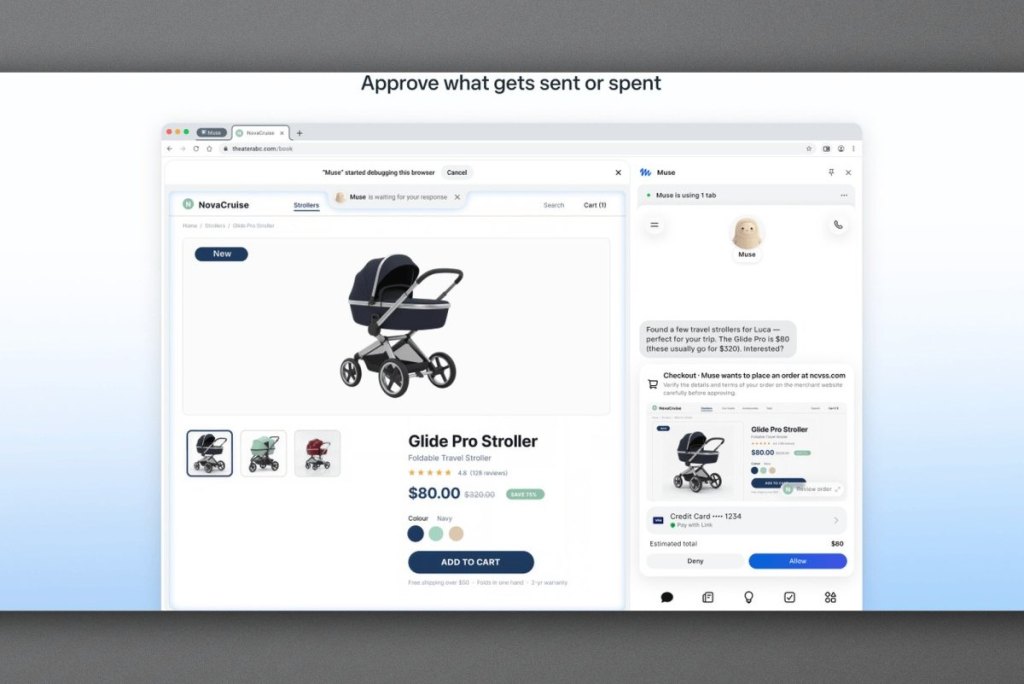
The extension places Muse in Chrome's side panel, so you can chat with it from any open page. In the Muse app you can already create custom Spaces, and the sidebar is another way to keep the assistant close while you browse.
When it works, Muse uses your own personal Chrome browser. It opens tabs in a separate tab group and can only act inside those tabs. Meta says the assistant can't see saved passwords, browsing history, or Chrome settings, and passwords typed into a web page are stripped from the text before Muse reads it. Because Muse can use any site you're signed in to without asking for credentials again, it can do more than a typical chatbot. That also means its access is fairly broad.
Controls and privacy caveats
According to the extension's page, you can review each action before it happens, Muse keeps a full activity log, and you can revoke any connector at any time. To pause it or take over the browser yourself, you can click the page, press Esc, or drag the tab out of Muse's group. Meta itself notes that Muse can do unexpected things, so you should watch it and step in when needed.
One easily overlooked detail is that Muse's activity can appear in your Google account and browsing history, which in turn can affect the ads and recommendations you see. For that reason, Meta advises signing out of any accounts you don't want the assistant to use before connecting the extension. To try it, you need Chrome 137 or later, then open Muse with Alt+Shift+C.
Migovi finds this direction sensible, since an assistant sitting right next to the page you're viewing is far more convenient than switching between apps. But that convenience is exactly where caution is needed. Muse can use any site you're signed in to, and Meta admits it can act outside what you intended, so trust should be extended gradually rather than handed over all at once. Shopping, booking, and calling features are currently limited to paying users in the US, so users in Vietnam may not get the full experience. If you still want to try it, sign out of important accounts such as banking or work email first, and pay attention to the action review the extension offers.
Source: Digital Trends
Reviewed by: Hero Association