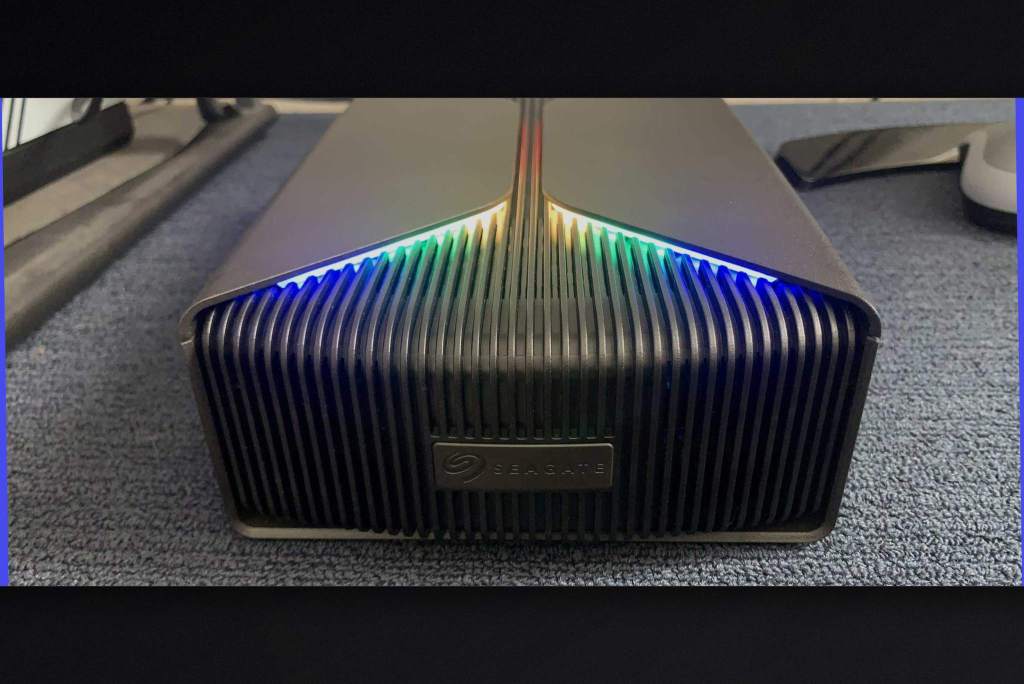
The Seagate FireCuda Forge runs USB4 at 40 Gbps, but when writing large files, its speed drops to ordinary hard drive levels much sooner than expected, even with a 2 TB SSD installed.
- A USB4 40 Gbps enclosure with a built-in 8 TB or 20 TB HDD; you supply an NVMe SSD to act as the cache, and without one the unit doesn't work
- Real-world tests topped out around 1 GB/s reading and 550 MB/s writing, below the 2.5 GB/s and 2 GB/s Seagate claims
- When writing a 450 GB file, speeds fell to 200 - 250 MB/s at roughly the 220 GB mark, even with a 2 TB SSD installed
- The 20 TB model costs 899 USD, and the 8 TB model costs twice as much as the same-capacity FireCuda X Vault, before you buy an SSD
Table of Contents
The idea behind a hard drive enclosure with an SSD cache
Rising NAND prices have pushed up SSD prices, which has given spinning hard drives a new lease on life, as Seagate's recent X Vault and One Touch launches show. The FireCuda Forge is the latest product in that run: a USB4 40 Gbps external enclosure with an 8 TB or 20 TB SATA hard drive inside, plus an M.2 NVMe slot where you install your own SSD to serve as a cache for the hard drive. Strictly speaking, it isn't quite a hard drive, but when you're talking about capacity per dollar, it still belongs in the same category.
In appearance, the Forge looks a lot like the X Vault. The main difference is that the X Vault runs entirely on bus power (at least 15 W), while the Forge requires the included AC power adapter. That makes sense, since there are two drives inside and no way to know in advance how much power the user's SSD will draw. To install an SSD, you remove four hex screws on the underside (Seagate includes the tool), slide the shell off, and then secure the SSD in the M.2 slot with the supplied screw. Seagate recommends an SSD with DRAM, but the FireCuda 530R sent for review is a DRAM-less model that relies on host memory buffer, and in testing the difference was very small.
Seagate's Toolkit software is a download from the company's website. It offers automatic backup, mirroring, firmware updates, and RGB lighting controls, although it only backs up local data to local devices and doesn't support network locations. The RGB lighting peeks out from under the top cover of the enclosure. The reviewer isn't a big fan of RGB but admits it makes photographing and testing the unit more fun. The drive carries a 2-year warranty and includes a 2-month Adobe Creative Cloud trial, while data recovery service isn't listed in the specifications and costs extra.
Real-world speed
On paper, Seagate quotes 2.5 GB/s for reads and 2 GB/s for writes. Synthetic benchmarks came in at about 1.5 GB/s read and 1.4 GB/s write, which was already fairly optimistic. When the reviewer moved to actual file copies, the Forge topped out at around 1 GB/s reading and 550 MB/s writing, even though the system correctly recognized USB4 at 40 Gbps and Windows was using the Stornvme driver. With Seagate's "Ragnar X/Alkemi" technology, the reviewer expected at least the performance of a standard USB4 enclosure with an NVMe SSD, which often approaches 4 GB/s in sequential tasks, so the results were a letdown.
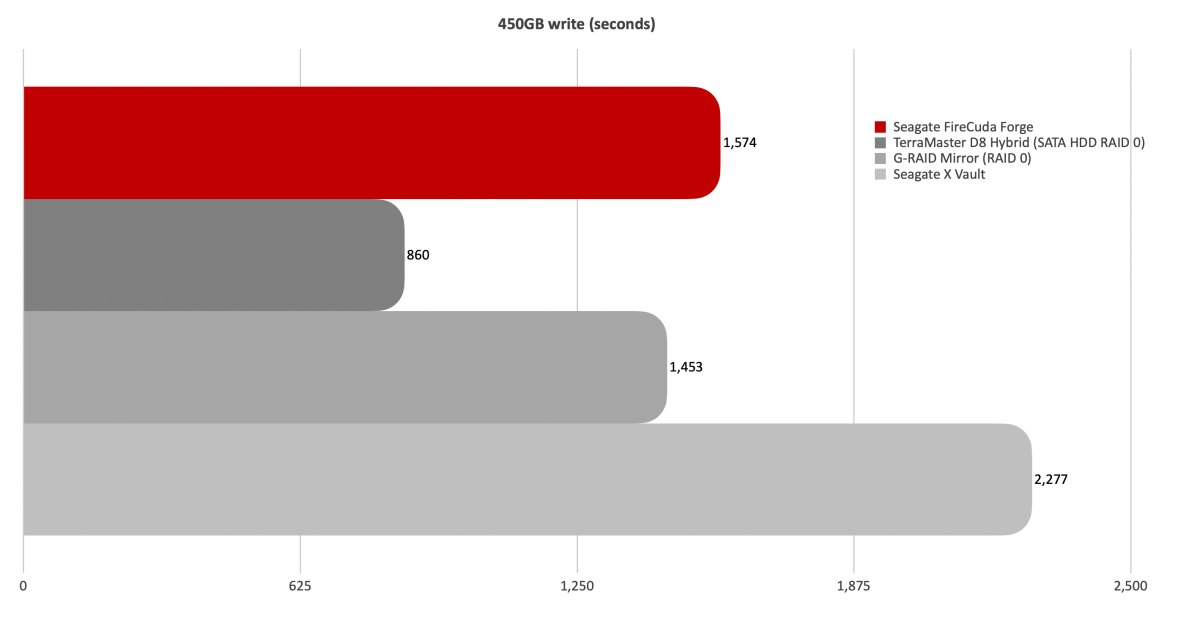
Compared with other devices, the Forge still leads by a clear margin. It leaves behind the OWC Gemini (Thunderbolt 3 with two SATA SSDs), the TerraMaster D8 Hybrid 2 (a 10 Gbps NVMe/HDD RAID enclosure that uses its SSDs as separate storage rather than cache), and even the single-drive FireCuda X Vault. In CrystalDiskMark 8, a few sequential tests on the RAID enclosure can keep up with the Forge, but in 4K responsiveness the Forge pulls well ahead. Keep in mind that this is the first SSD-cached hard drive enclosure the reviewer has tested, so none of the comparison devices is a perfect match.

The weakness shows most clearly in the sustained 450 GB write test. At around the 220 GB mark, write speed falls further to 200 - 250 MB/s, meaning data is being written straight to the hard drive. That point arrives much earlier than expected, given the installed SSD has a capacity of 2 TB. To rule out a fault in the SSD itself, the reviewer tested the 530R on its own, and in the same 450 GB write it slowed only to 1.2 GB/s, far higher than what it managed inside the Forge.
Further tests with other SSDs show that SSD capacity affects the size of the cache. With a 4 TB Kingston Renegade G5 PCIe 5.0 SSD with DRAM, the 450 GB write no longer fell to hard drive speed, and the CrystalDiskMark 8 numbers stayed almost the same. By contrast, with an old 256 GB Samsung 980 Pro installed, sequential write speed with a 64 GiB dataset dropped to just 426 MB/s, while with a 16 GiB dataset it matched the larger SSDs. This suggests the Forge doesn't use the entire SSD as cache, and that firmware updates could improve things later, although firmware 1.32, released after the first test, made no difference.

Pricing and whether to buy
The 20 TB model the reviewer tested costs 899 USD, about 250 USD (23%) more than a standard 20 TB external hard drive, a premium that is still acceptable. The 8 TB model is a different story: it costs twice as much as the 8 TB X Vault, which has the same design and sells for 299 USD, and you still have to buy an SSD, from about 130 USD for 512 GB to 300 USD for 2 TB. Without an SSD the Forge is unusable, because with none installed it shows up as a single unformatted 3 MB partition.
At that price, the reviewer argues you could build a similar setup yourself, for example an 8 TB X Vault plus a 1 TB external SSD, then move files with Windows File History or Robocopy, or use Windows' storage tiering feature. He already backs up his internal SSD over the network to hard drives in NAS enclosures, which can do plenty of other things as well. His conclusion is that if you need both SSD-like speed and hard drive capacity, the Forge delivers, but you pay a steep price for that experience: consider the 20 TB model and skip the 8 TB one unless you have money to spare.
Migovi finds the idea of an SSD cache inside a hard drive enclosure very sensible, but the test results show the hardware doesn't make full use of USB4 40 Gbps: real-world speed is only on par with a 10 - 20 Gbps enclosure, and when writing heavy files the SSD helps only for the first stretch. So anyone who needs to copy hundreds of gigabytes at a time, such as video editors or people backing up an entire machine, shouldn't expect it to always run at SSD speed. If your main need is a large storage pool, pairing an external hard drive with a separate SSD is both cheaper and more flexible, and the 20 TB model is only worth a look if you really want everything packed into one box. The 8 TB model is hard to justify when it costs twice as much and the platform inside is much like the X Vault.
Source: PCWorld
Reviewed by: Hero Association