WhatsApp's scheduled messages send even when your phone is powered off and stay end-to-end encrypted, but group chats and Business accounts come with a few caveats.
- WhatsApp announced the feature on November 25, with a global rollout to iPhone and Android over the coming weeks
- You can schedule a message from 10 minutes to 14 days ahead, in both private and group chats, for text, photos, and video
- Messages send on time even if the phone is off, keep end-to-end encryption, and recipients see no sign that they were scheduled
- Not yet available on WhatsApp Business, and it is unclear whether a scheduled message can be edited
Table of Contents
From rumor to official release
Most of us have come up with the perfect midnight birthday greeting, or a good-luck message for tomorrow morning's interview at 10 p.m., only to drop it because sending it right then felt a little odd. On November 25, WhatsApp announced a scheduled message feature to solve exactly this problem. The company calls it one of its most requested features, and it covers both iPhone and Android.
The feature is not entirely new to anyone following the app. The first hints appeared in February, and a limited Android beta followed in October. What has changed is that everything is now official: WhatsApp says the rollout is global, and the Help Center already has a clear guide, so you can learn how it works in advance. However, the company says the update will arrive gradually over the next few weeks, so your phone may not have it right away.
How to schedule and manage messages
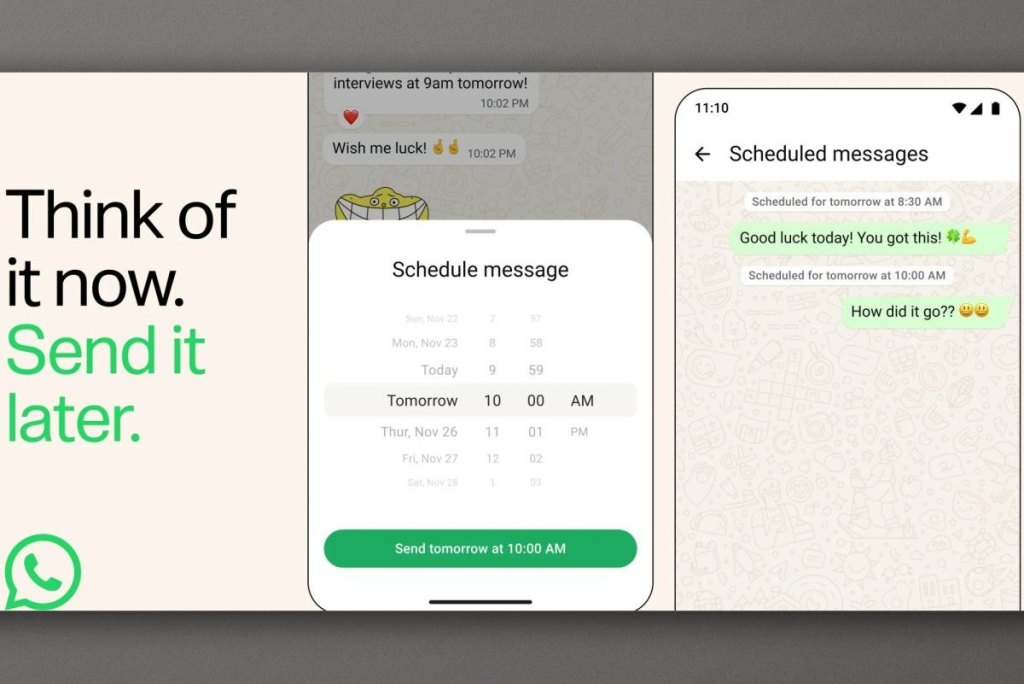
The process feels familiar. You write your message as usual, press and hold the send button, then pick when you want it delivered. The minimum scheduling time is 10 minutes and the maximum is 14 days. It works in both private and group chats, and text, photos, and video are on the supported list. On the recipient's side, it looks like an ordinary message, with no sign that you scheduled it ahead of time.
Your phone doesn't need to be on when the time comes, either. WhatsApp says the message is still sent if the device is powered off or out of battery. Scheduled messages keep end-to-end encryption just like other personal conversations, meaning even WhatsApp can't read the content. To review your scheduled messages, tap your profile picture and open the Scheduled messages section, then press and hold any message to delete it. Note that people who tried the iPhone beta in October saw this list inside the chat info screen, so the final interface may differ from what the first reports described.
Things to keep in mind
In group chats, a scheduled message reaches only the people who are in the group when you write it. Anyone who joins later will never see it. That is a reasonable safeguard, but keep it in mind before scheduling an announcement for a group that is still adding new members.
According to the Help Center, WhatsApp Business is not supported for now, so shop owners and service providers on the business app still have to send reminders manually. Although the feature is new to WhatsApp, Telegram and Signal have offered scheduled sending for a long time, so WhatsApp arguably arrives rather late. The company also hasn't said whether a scheduled message can be edited, and the only method the Help Center describes is deleting the old message and writing a new one.
Scheduled sending may sound minor, but it fits everyday messaging habits such as sending a greeting right at midnight or a reminder early in the morning. Because recipients can't tell a message was scheduled, the note feels far more natural than staying up late to watch the clock. Migovi sees the biggest weakness today as the inability to edit a scheduled message: a typo or wrong time in a message set 14 days ahead means deleting and starting over, so read the content carefully before choosing a time. In group chats, check the member list before scheduling an important announcement, and anyone on WhatsApp Business shouldn't expect this feature in the next few weeks. If you don't see the option when you hold the send button, just update the app and wait, since WhatsApp is rolling it out gradually rather than to every device at once.
Source: Digital Trends
Reviewed by: Hero Association