You can pin Codex or Projects right to ChatGPT's tab bar, but the first wave is limited to Pro users aged 18 and up, and excludes the EU, the UK, Switzerland, and South Korea.
- The ChatGPT mobile app gets a new tab bar at the bottom of the screen, with Home, Dot, and a grid of tools that lets you pin the features you use most
- The first wave is for Pro users aged 18 and up, and a small group of Plus users may also see it; if a "New ChatGPT Design" entry appears in Settings, you can switch it on or off yourself
- Not available in the European Economic Area (including the EU), the UK, Switzerland, and South Korea
- Dot is being tested with a small number of Plus users and is opening to all Business Standard plans (in the US)
- OpenAI has not said when the design will roll out more widely
Table of Contents
A new tab bar in ChatGPT mobile
OpenAI is rolling out a new mobile experience for ChatGPT, aimed at getting users to their favorite features faster and helping them discover tools they may not have noticed before. Thibault Sottiaux (Tibo), who works on Codex and ChatGPT, shared a demo of the design on November 19.
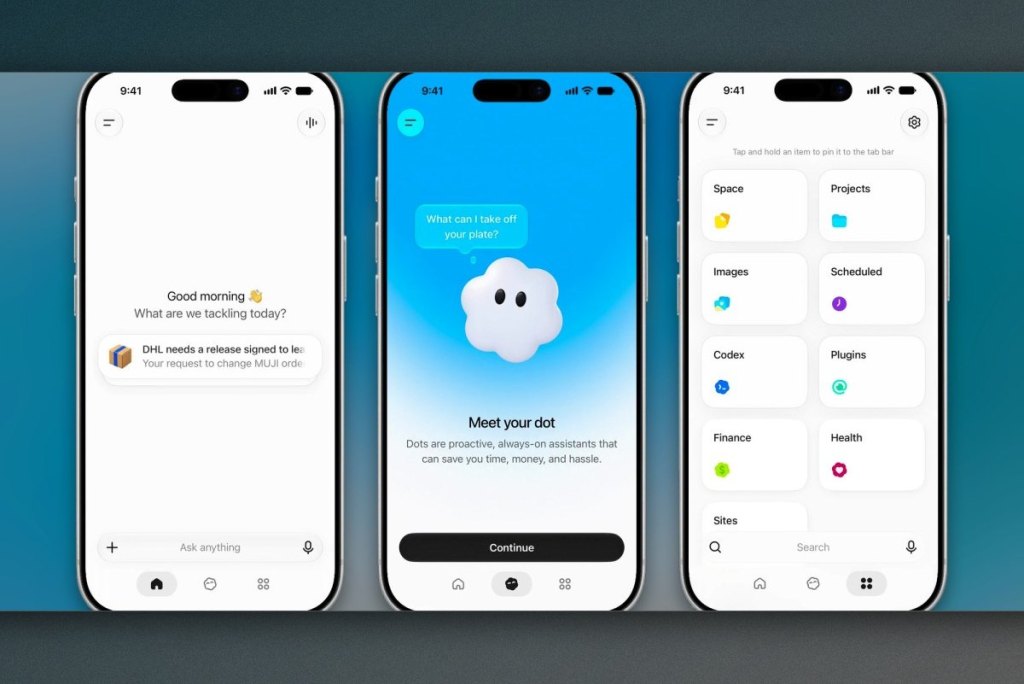
The most visible change is a tab bar along the bottom edge of the screen, made up of a Home screen, a dedicated tab for dot, and a grid holding the rest of the toolset. Home greets you with "Good morning" and an "Ask anything" input box. The Dot tab takes you straight into a conversation with your dot through a "Message dot" composer, along with a note that Dots are in early preview. The dot here is OpenAI's always-on kind, and giving it its own tab suggests the company wants you to be able to start talking to it at any moment without digging through layers of menus.
The tool grid and pinning
The third tab opens a grid of features with the hint "Tap and hold an item to pin it to the tab bar." In the preview, the grid includes Space, Projects, Images, Scheduled, Codex, Plugins, Finance, Health, and Sites. When you tap and hold Codex, the app shows two options, "Reorder" and "Pin to tab bar." Once pinned, the Codex icon sits right next to Home and dot, so people who use Codex often won't need to open the grid every time.
Who gets it first
The first wave is for ChatGPT Pro users who already have a dot or are eligible to create one, and some of them will see the new layout switched on by default. If a "New ChatGPT Design" entry shows up in Settings, you can turn it on or off there, so you aren't forced onto the new interface if you're not used to it yet.
OpenAI says the rollout starts with Pro users aged 18 and up in regions where dot is already available. The European Economic Area (including the EU), the UK, Switzerland, and South Korea are excluded from this wave, while a small group of eligible Plus users will also see the new experience. Vietnam is not on the exclusion list, but because the feature depends on whether dot has reached your region, it's not possible to say for sure when users in the country will see it.
Dot is expanding to more plans
Also on November 19, Tibo said OpenAI has begun testing dot with a small number of ChatGPT Plus users and is bringing dot to all users on the Business Standard plan. According to OpenAI's help pages, the Business Standard expansion currently applies to eligible members in the United States. Pro users in the US could already message their dot in the beta, and Tibo added that he is eager to hear feedback before the new mobile design is rolled out more widely.
Migovi sees the new tab bar as a sign that OpenAI wants to turn dot from an experiment into the main way into the app, since nobody gives a permanent tab to something they don't expect people to use regularly. Letting users pin Codex or Projects to the tab bar also makes sense given the growing number of tools in ChatGPT: a grid that users can customize is less cluttered than adding yet more buttons to the main screen. That said, dot is still in early preview and the first wave reaches only a narrow group, so the design may change before it reaches the majority of users. If you're on the Pro plan, open Settings and check for "New ChatGPT Design" to try it early. If you don't see it yet, just wait for OpenAI to expand the rollout; there's nothing else you need to do.
Source: Digital Trends
Reviewed by: Hero Association