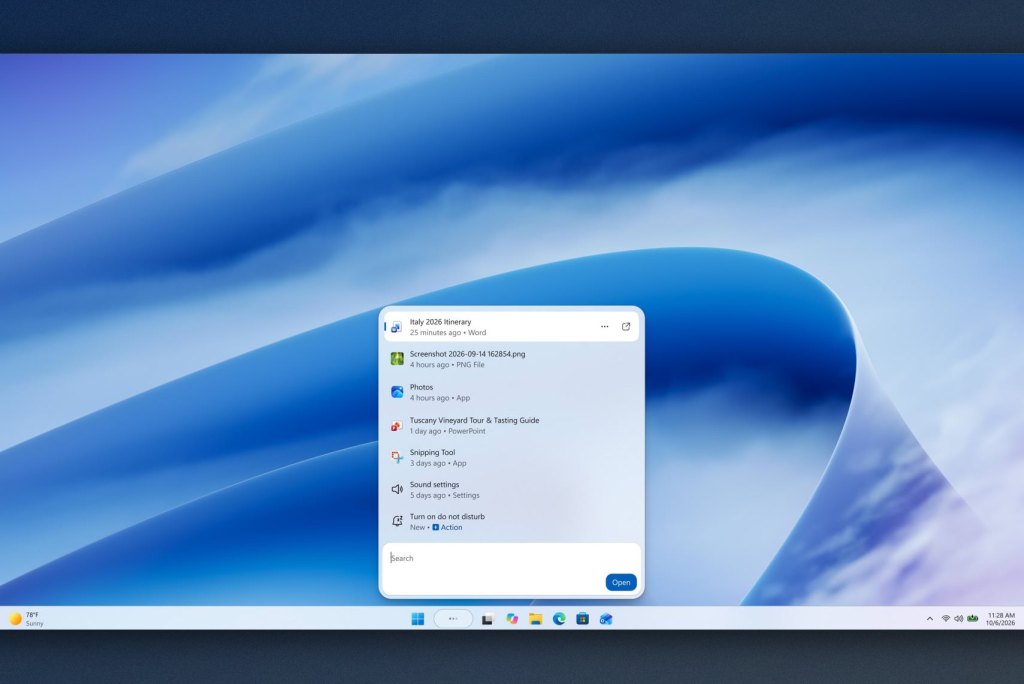
The new Windows Search lets you type commands like mute or turn on Bluetooth and run them instantly. It has been rewritten in WinUI 3, with promises of faster performance and lower memory use.
- Windows 11 KB5132057 introduces a new Windows Search that can carry out thousands of quick actions from simple typed commands
- The interface switches to a single results list, built on WinUI 3 with promises of faster speed and lower memory use
- Copilot answers directly in the search box, and ads were already removed in the July update
- The update is rolling out gradually, and only English is supported at first
Table of Contents
The new Windows Search in KB5132057
Microsoft has released update KB5132057 for Windows 11, bringing a new Windows Search that many users have been waiting for. Search has long been one of the most criticized parts of the operating system. The most noticeable change is that the search box can now perform thousands of quick actions from simple typed commands, such as "switch to dark mode," "turn on Bluetooth," "dim my screen," "mute," or "minimize all my windows."
The feature goes beyond tweaking system settings. The search box also supports Phone Link actions, such as sending a message from a phone connected to your PC, and shows weather, stocks, and other data right in the results. As a result, Search is less a place to find files and more a place to give your PC orders without digging through layers of menus.
The results now sit in a single list, replacing the old design with its very large preview pane on the side.
A cleaner interface and lighter performance
For tech enthusiasts, the most interesting part is probably the foundation underneath. The new Windows Search is built on WinUI 3, which Microsoft says makes search faster while using fewer system resources. Early testing has also reportedly shown noticeable improvements in both speed and memory usage.
Search quality is expected to improve as well, since Search should handle typos and synonyms better than before. It also offers richer file detail displays and web content previews. Copilot is integrated too, with answers appearing directly in Search along with a shortcut to open the full app. This follows the July update, when Microsoft removed ads and promotional content from Search and added an option to hide web and Microsoft Store suggestions.
Other changes and how to get the update
KB5132057 also includes a few smaller improvements. The Run dialog has been redone in a modern design. Windows Hello will briefly brighten the screen to recognize faces better in low light. Searching from This PC in File Explorer now relies on the indexer, making it faster and consistent with searching from the File Explorer Home page.
Microsoft says the update is being rolled out gradually, meaning users will receive it in waves rather than all at once, so some PCs may not show the new Windows Search even after updating. The experience is also English-only at first, and the company says the system now handles typos much better, making interaction with Windows through the search box smoother.
Migovi thinks the direction is sensible, since Microsoft is fixing exactly what users have complained about for years: search that is slow, cluttered, and mixed with ads. Typing commands to change settings is also worthwhile, but it only becomes truly useful if it runs reliably and lightly as Microsoft promises. So far there are only early test results, with no concrete measurements. For users in Vietnam, the immediate obstacle is that only English is supported at first. If your PC has already received the update, you can try English commands. If not, there is no need to rush to install it manually, since the rollout is still gradual.
Source: TechPowerUp
Reviewed by: Hero Association